Safe Environment Training Instructions
Welcome to the 2026-2027 Safe Environment Training (SET) Renewal! Every year those of us who work or volunteer in ANY ministry or function within the Diocese of Phoenix (e.g., St. Benedict Parish, St. John Bosco School, St. Vincent de Paul) MUST take Safe Environment Training (SET).
The training is done through the CMG (Catholic Mutual Group) website (cmgconnect.org).
There are two categories: 1. Those who have never taken Safe Environment Training (SET) and 2. Returning Safe Environment users.
For those new to SET program you will need to create an account with a username and password.
- New Users
- In your browser or search engine type in cmqconnect.orq and start connecting with our diocese by typing in Phoenix for your organization.
- Next you will need to create an username and password. The diocese has asked people to use their first name.last name.dop. This allows us to find your accounts faster and is more efficient. Then you create a password and finish setting up your account.
- Once you create your account, click on My Trainings on the left side of the screen.
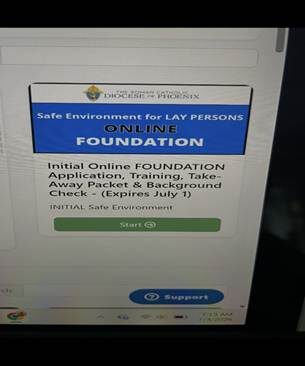
- Then on your training page, scroll down slightly and you will see the blue border Safe Environment for Lay Persons ONLINE FOUNDATION training.
- Do not take Live training because it will lock up your account since we are not offering live training right now.
Click start and the curriculum takes about 50 -60 minutes to complete. Near the end it will ask you for your social security number which must be provided so that the diocese can run a background check on you. Only the diocese sees your SS# and background check not the parish. Please enter the number in accurately or the system will not process your certification.
If you have any questions you can text me or call me (Debbie) at 480-529-4828.
- Returning Users
- Returning users, go to cmgconnect.org and type in Phoenix and click on the button “Go to Diocese.”
- Then click on sign into existing accounts which is on the upper
- right corner of the screen and enter your username and password. (If you need assistance, text me (Debbie) at 480-529-4828).
- Once you are in, it will display your dashboard. Click on “My
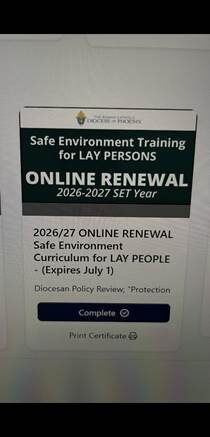
Trainings.” Look for 2026-27 green border Safe Environment ONLINE
RENEWAL for returning volunteers.
Click “START.”